Unleash the potential of your Key Stage 1 and Key Stage 2 pupils with LEGO Education SPIKE Essential, the hands-on STEAM solution that brings core curriculum concepts to life through playful, narrative-based problem-solving.
This engaging set is specifically designed for primary school classrooms, seamlessly integrating Science, Technology, Engineering, Arts, and Maths (STEAM) with Computing curriculum requirements. Watch as your pupils transition from curious thinkers to confident, creative problem-solvers!
Key Features for the British Classroom
Curriculum-Aligned Units
- Access ready-made, comprehensive unit plans with over 100 hours of classroom content. Lessons are specifically aligned with the UK National Curriculum, including Computing, Design & Technology, Science, and Maths.
Icon & Word Block Coding:
- The intuitive SPIKE App features a progressive block-based coding language, inspired by Scratch. Start younger pupils with simple Icon Blocks before progressing to the more complex Word Blocks, fostering vital computational thinking skills.
Narrative-Based Learning:
- Relatable Mini figures and everyday themes immerse pupils in storytelling, making complex concepts like energy transfer and collision accessible and fun.
All-in-One Solution:
- The robust 449-piece set includes everything you need for a complete STEAM experience:
- Intelligent 2-Port Hub: The brain of the operation, featuring Bluetooth connectivity and a 6-axis gyro sensor.
- 2 Small Motors: To bring models to life with movement.
- Colour Sensor: To detect colours and light.
- 3×3 Light Matrix: For visual feedback and creative expression.
Seamless Classroom Management
- The durable storage box comes with colour-coded sorting trays, ensuring tidiness and making kit management a breeze for teachers and pupils alike.
Why Choose SPIKE Essential for Your School?
| Benefit | Focus for Primary Education |
| Develops Computational Thinking | Learn foundational coding concepts like sequencing, loops, and debugging. |
| Supports Literacy & Maths | Lessons feature extensions that bolster key Maths and English Language skills. |
| Fosters Collaboration | Encourages teamwork, communication, and social-emotional development through joint projects. |
| Builds Confidence in STEAM | Provides a low-floor, high-ceiling approach, allowing all abilities to succeed. |
| Pathway to Progression | Part of the LEGO Learning System, preparing pupils perfectly for the transition to SPIKE Prime in secondary education. |
Transform your Computing and D&T lessons with a practical, engaging approach to STEAM that British pupils genuinely love.
Perfect for Key Stage 1 (Ages 6+) and Key Stage 2
Unboxing and setup video
In this video I unbox a Lego Spike Essential kit, and take you through all the lego parts and features, including:
The Lego Spike Essential Motor
What is the SPIKE Essential Hub?
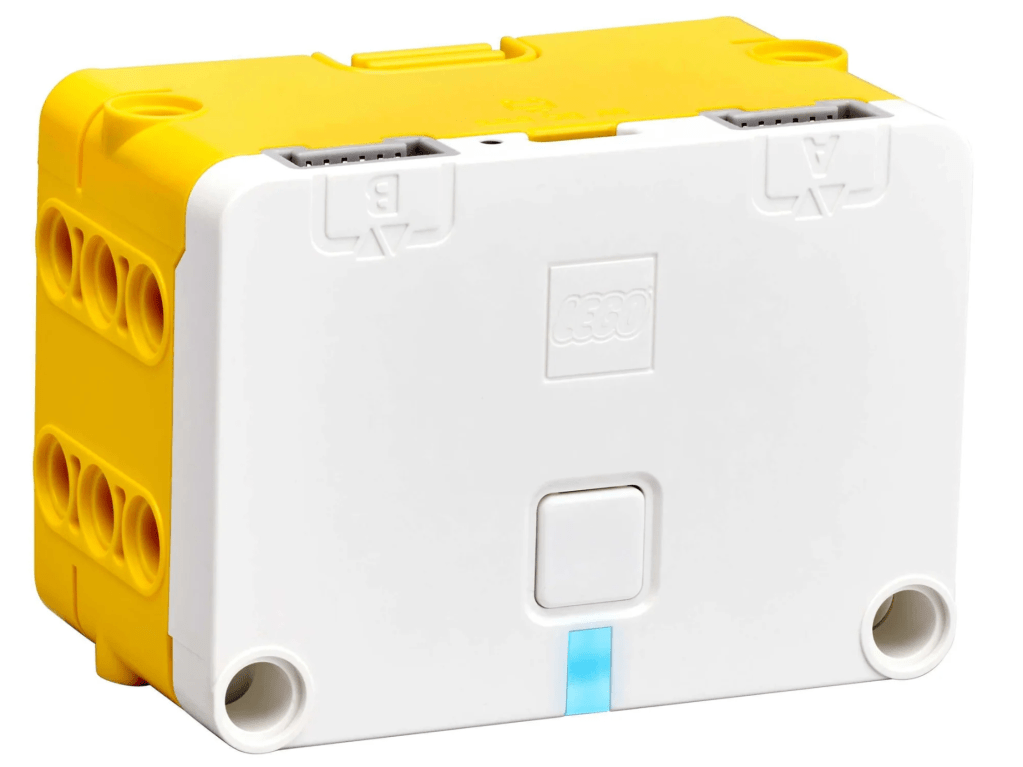
The Hub is essentially a programmable control unit (a ‘smart brick’) that runs the code created in the SPIKE App. It uses the LEGO Technic Small Hub form factor, meaning it’s compact and designed for easy integration into smaller models.
Key Features and Functionality
- Integrated Brain and Sensors: The Hub is a control unit with intelligence already built in:
- Processor: It contains the microprocessor that executes the programs written by the pupils.
- Built-in Gyro Sensor: As we discussed, it includes an integrated six-axis sensor (gyroscope and accelerometer) to detect movement, tilt, and gestures like tapping or shaking.
- Connectivity and Power:
- Ports: It features two input/output (I/O) ports (Ports A and B). These are the connection points for the external components: the Small Motor, the Colour Sensor, and the Light Matrix. The Hub automatically detects what is plugged into each port.
- Wireless: It connects wirelessly to smart devices (like tablets or laptops) via Bluetooth Low Energy (BLE), allowing pupils to upload and run their programs without a cable.
- Wired: It has a Micro USB port used for wired connection to a device (for coding/debugging) and, more commonly, for charging the battery.
- Power: It uses a specially designed rechargeable Lithium-ion polymer battery (around 620 mAh) that sits inside the Hub and is charged via the Micro USB port.
- User Interface:
- Single Button: There is a single, intuitive button for turning the Hub on and off, which simplifies the user experience for younger children.
- Programmable Light Indicator: An RGB LED light is located near the button. This LED communicates the Hub’s status (like low battery or connected via Bluetooth) and, importantly, can be coded by the pupils to display any of the 10 available colours.
- Building Integration: The Hub is built using the standard LEGO Technic system, with pin holes and attachment points on all sides, ensuring it can be robustly built into any model.
In short, the Hub acts as the essential bridge between the abstract world of coding and the physical world of LEGO bricks, empowering pupils to control, sense, and bring their ideas to life.
The Lego Spike Essential Motor
What is the SPIKE Essential Motor?
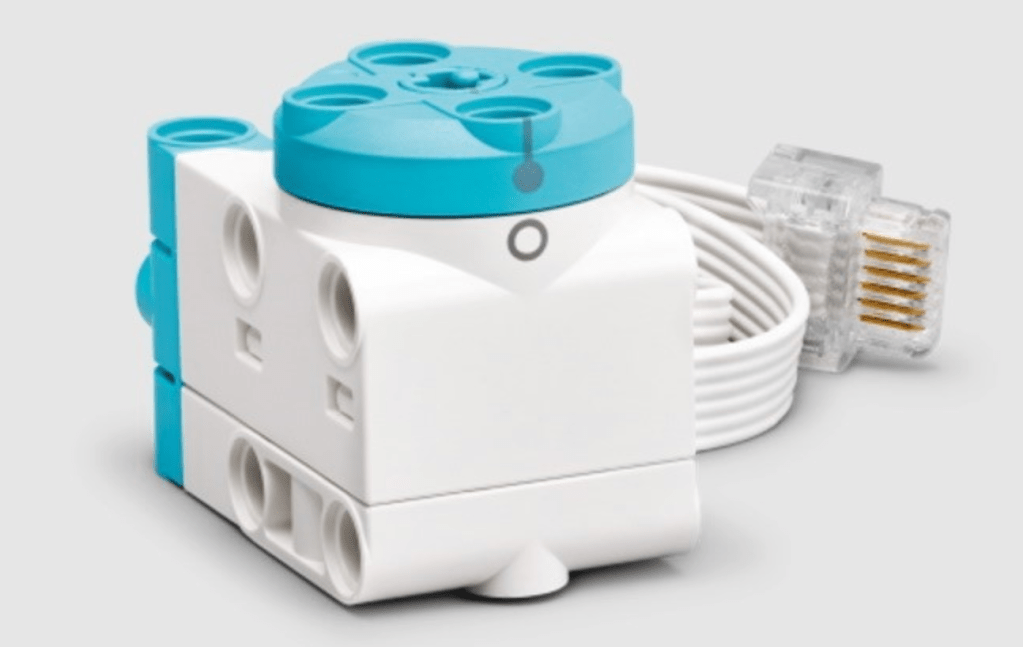
The motor included in the LEGO Education SPIKE Essential set is a small angular motor. It’s a low-profile, compact motor that serves as the primary way for children to bring their LEGO creations to life by adding movement.
Key Features and Functionality
- Dual Functionality: It’s designed to function as both a motor (providing rotation/power) and a sensor (measuring rotation).
- Integrated Rotation Sensor: Crucially, it has a built-in sensor that reports both the speed and the position of its output. This allows for precise, controllable movement in the models.
- It measures the relative position (in degrees) and the absolute position.
- Interactive Control: The motor is part of the LEGO Powered Up system and connects to the SPIKE Essential Hub. Through the LEGO Education SPIKE App, pupils can code the motor to:
- Start and stop.
- Run for a specific number of rotations or time.
- Set the speed and direction.
- Building Integration: Like other LEGO Technic components, it has a Technic build geometry, featuring an output disc with a crosshole, making it easy to integrate into various models for driving wheels, creating simple mechanisms, or operating levers.
- Technical Specs: While small, it’s designed for light workloads where space is limited. Its stall torque is lower than the medium angular motors (around 5 Ncm compared to 18 Ncm), but its ability to offer full rotation control makes it versatile for steering and other precise tasks.
In short, it’s an educational and highly functional component that allows young learners to experiment with concepts like energy transfer, motion, speed, and simple robotics through play and coding. It’s a brilliant way to introduce them to the fundamentals of engineering!
The Lego Spike Essential Light
What is the SPIKE Essential Light Matrix?
The light element in the LEGO Education SPIKE Essential set is a 3×3 RGB Light Matrix. Put simply, it’s a small, square screen made up of nine individual, colour-changing LED lights. It’s the perfect tool for young learners to display emotions, simple messages, or visual cues in their programmable creations.

Key Features and Functionality
- 9 Programmable Pixels: The matrix is a grid of 3 rows and 3 columns, meaning there are nine individual RGB (Red, Green, Blue) LEDs that can be controlled.
- Colour and Brightness Control: This is where the fun starts!
- Each of the nine pixels is fully programmable to display one of 10 different colours.
- The brightness of each pixel can also be adjusted through 10-step increments, allowing for subtle lighting effects.
- Display Capabilities: Connected to the SPIKE Essential Hub, pupils can use the LEGO Education SPIKE App(using Icon Blocks or Word Blocks) to code the matrix to:
- Show Images: Display pre-set images (like a heart or a happy face).
- Show Text: Scroll short words or numbers across the display.
- Create Animations: Cycle through different frames or patterns to create simple, dynamic animations.
- Technic Integration: Like the motor, it has the standard LEGO Technic build geometry. This means it can be easily clipped into Technic beams and pins, making it simple to incorporate into the structure of their models.
The Light Matrix is fantastic for teaching concepts like sequencing, loops, and visual communication in coding, helping pupils understand how to use light to give their robots and inventions personality and purpose.
The Lego Spike Essential Colour Sensor
What is the SPIKE Essential Colour Sensor?
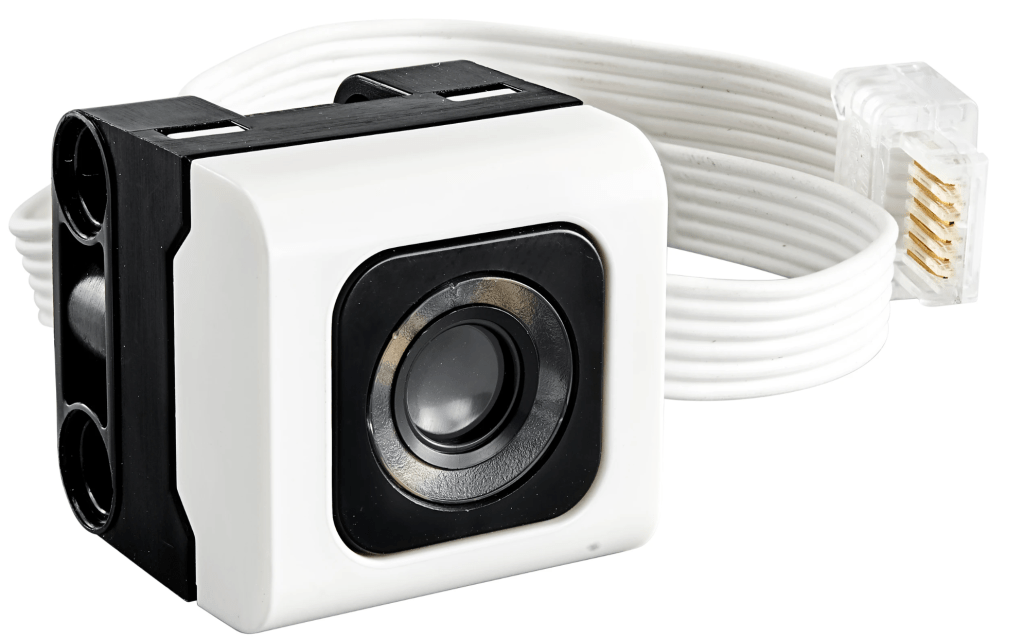
The colour sensor is a LEGO Technic sensor that is capable of detecting and reporting various aspects of light. Its primary role is to act as an input device, providing data to the SPIKE Essential Hub so that the programmed model can react to its surroundings.
Key Features and Functionality
- Three Modes of Detection: The sensor is versatile and can measure three different properties of light:
- Colour: It can distinguish between several distinct LEGO colours (such as red, blue, green, yellow, black, and white).
- Reflected Light Intensity: It emits a small light and measures how much of it bounces back from a surface. This is typically reported as a percentage (0% to 100%) and is essential for tasks like line-following.
- Ambient Light Intensity: It measures the amount of light already present in the environment (e.g., from room lights or sunlight), also reported as a percentage.
- High Accuracy: The sensor has a good sample rate (typically 100 Hz), which means it takes readings quickly and accurately, allowing for reliable and repeatable results in experiments and coded activities.
- Coding Reaction: Connected to the SPIKE Essential Hub, pupils use the LEGO Education SPIKE App to write conditional code (known as ‘If/Then/Else’ statements). For example:
- IF the sensor sees RED, THEN the motor turns left.
- IF the reflected light is LESS THAN 50% (meaning it’s over a dark line), THEN the model stops.
- Building Integration: It features the standard Technic geometry, making it simple to build into the models. For optimal performance, the sensor is typically positioned at a specific distance (around 16 mm) from the surface being read.
In essence, the Colour Sensor introduces young learners to the crucial coding concept of conditional logic and the real-world application of sensor technology in robotics, allowing them to create smart, reactive models.
The Lego Spike Essential built in Gyro-Sensor
What is the Built-in Gyro Sensor?
The Gyro Sensor is not a separate component that plugs in, but is actually an integrated part of the Small Hub itself, along with an accelerometer. Together, these form a six-axis inertial measurement unit (IMU).
Its role is to detect and report the Hub’s rotation and tilt in three-dimensional space, providing crucial feedback that allows models to react to movement and maintain balance.
Key Features and Functionality
- Rotation and Orientation Detection: The sensor measures movement around the three axes:
- Yaw: Rotation (turning) left or right (like a boat turning on the spot). This is vital for making accurate, repeatable turns in robotics.
- Pitch: Tilting forward or backward (like nodding your head).
- Roll: Tilting side-to-side (like rocking a boat).
- Gestures and State: Because it includes both a gyroscope (measures rotation rate) and an accelerometer (measures acceleration and gravity), the Hub can detect specific states and gestures, such as:
- Whether the Hub is tilted to the left, right, front, or back.
- When the Hub is tapped, shaken, or in free-fall.
- Coding Precision: When writing programs in the LEGO Education SPIKE App, pupils use the gyro-sensor data to:
- Control Turning: Program a robot to turn a precise angle (e.g., exactly 90 degrees) and use that reading to stop the motors.
- Conditional Logic: Create ‘If/Then’ statements to trigger an action based on tilt (e.g., IF the Hub is tilted RIGHT, THEN move the motor FORWARD).
- Stabilisation: Develop simple self-balancing models by programming the robot to counteract unwanted movement.
- Calibration: For tasks like turning, the sensor’s current rotation angle can be reset to zero at the start of a program, ensuring that all angular measurements for the activity are accurate and relative to the starting position.
Essentially, the built-in Gyro Sensor introduces young students to concepts of orientation, measurement, and advanced robotics control, enabling them to create complex, responsive behaviours without needing an external sensor.
Lego Spike Essentials Lesson Plans
If you want to jump into the learning, please visit the Lego SPIKE Essential Lesson Plans page.
Alternatively, if you are looking for Coding Tutor in Hertfordshire to support your children with this, I can also help.
 Mr Vullo - Alternative Education